Introduction
In this area you will enter some basic information about your homeschool, including selecting the days of the week that you wish to designate as 'school days'. You can update this information at any time by choosing 'School Profile' in the HSTOnline menu while logged in under the Administrator username and password for your account.
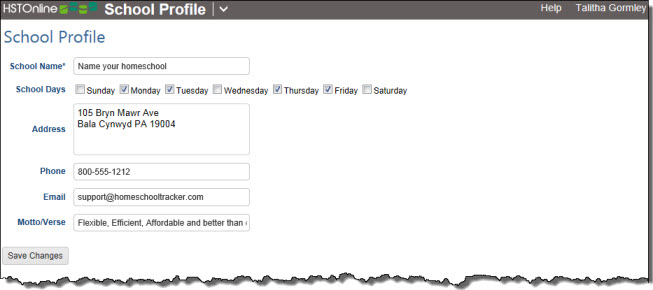
Entering School Profile Information
- On the HSTOnline menu, click or touch School Profile under the 'Your Account' section. This .
- On the School Profile page, enter a name for your school, up to 150 characters.
- Check off the days of the week when you normally hold school.
- Enter any additional contact information for your school as desired.
- Click the 'Save Changes' button to add this information to the database.
School Name
Your homeschool needs a name. The name can be anything you like, up to 150 characters. The name you choose will appear on Report Cards and Transcripts, and in the header of your reports. Here are some ideas for naming your school:
- Use your own last name (The Smith School)
- Your street name (Main Street Academy)
- Something in your environment (Little Creek Learning Center)
- Include your town name (The Springfield School)
School Days
Designate your school days - the days of the week when you normally hold school. This will assist you when marking attendance, copying assignments and submitting Lesson Plan items. You can always choose to book an assignment on a non-school day if you wish and/or mark selected dates as Days Off. The days you indicate as School Days will affect be applied to each School Year.
- Put a checkmark next to the days on which you generally hold school during the week. Non-school days can then be automatically skipped when creating Assignments or entering Attendance records.
- Click the 'Save Changes' button to retain your entries.
Additional Information
The rest of the fields are optional for your School Profile. Complete them or leave them blank as you wish. Enter whatever you wish, up to 150 characters each.