Grade Looks Wrong - What Happened?
What is Weighted Grading?
Weighted grading, an optional feature in HSTOnline, allows you to assign greater value to certain assignments within the same Course. You can opt to use Weighted Grading in one Course, all your Course, some of them, or none of them. Weighted Grading is not for everyone and you'll have to decide it if is a necessity for each of your Students.
Without weighted grading, all assignments have an equal effect on the overall grade. With weighted grading, you assign a value - or weight - to Activities within a Course. The weights you set can be any value you like, as long as the total weight for all Activities within a single Course equal 100%. The assigned weight is multiplied against the grades within the Activity, and finally the weighted grades for each Activity are added together to get the final Term grade for the Course. Because HSTOnline allows you to grade just the items you choose to, you may find that Weighted Grading is not necessary in your homeschool.
If you decide to use the Weighted Grading feature, you must insure that there is at least one completed, graded Assignment for each weighted Activity within the Course in each Term of the school year or the student's overall grade will be adversely affected by the missing percentage(s). When Weighted Grading is in use, the Grading Overview area is especially helpful as it will show how the weighting is affecting your student's grade for each term.
How much should I weight each activity?
It depends on what is important to you, the Course, your curriculum, your umbrella school if you report to one, and, possibly, your student's strengths and weaknesses. Generally, the larger a portion of the course work the activity covers, the higher the weight assigned. So research papers are more than journal entries, test more than quizzes, etc. The only unbreakable rule is that the total of all weights within a course need to equal exactly 100%.
| In order to enable the Weighted Grading option in a Course: |
|---|
|
Setting Weighted Grading
In the Courses Help Page, there are directions for adding weighting when creating a new Course. The directions below explain how to edit a Course to add weighted grading.
- On the HSTOnline menu, click or touch Courses.
- On the Courses page, double-click on the item you want to change to open the Edit Course window.
- Alternatively, you can click once on the item you want to change and then click the Action button and choose Edit to open the Edit Course window.
- On a touch device, touch the item you wish to edit and then touch the Action button and touch Edit to open the Edit Course window.
- At the bottom of the edit view, you will see when and by whom the item was created as well as when and by whom it was last updated.
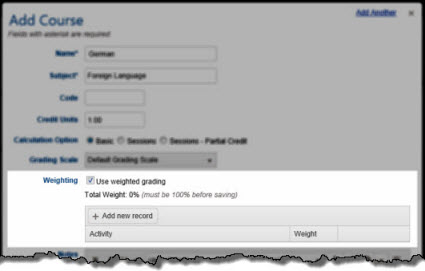
- Weighting: To use weighted grading for this course, check the 'Use weighted grading' box. The Activity/Weight box will appear along with a tally of the weighting that
has been applied for this Course. You cannot save this Course until the total weight for all selected activities is equal to 100%
Weighted Grading 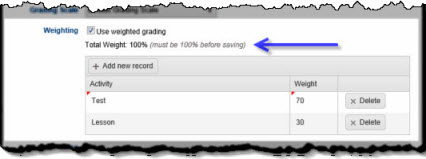
Weighting equals 100% - Click or touch the 'Add new record' button. A new line will be added to the Weighting table.
- Choose an Activity from the drop down list. Scroll through the list and click or touch the Activity you want to use. Or you can type a letter in the selection box to move to that area of the list.
- Enter a weight for that activity, anything from 1 to 100.
- Repeat the above steps until all weighted activities have been added and the total weighting equals 100%.
- To change an entry you have already made, click or touch the Activity to select a different Activity from the list; click or touch the weight to change that value.
- To remove an entry you have already made, click or touch the Delete button for that line entry.
- Make whatever other changes are needed for the Course.
- Click or touch:
- Cancel to abandon the changes and close the Edit Course window.
- Save to commit the changes to your Subject and close the Edit Course window.
- Click or touch the Previous or Next hyperlink in the top right corner to save your changes to this Course and move to the previous or next Course in the list. You can click or touch Previous or Next until you have made all the changes you want to your Courses and then click the Save button to end the Edit process. If you reach the beginning or end of the list when clicking or touching Previous or Next, the Edit window will close and you will be returned to the list view.
The Effect of Weighted Grading
To see how Weighted Grading can make a difference in your student's overall grade, we will take the examples given for Averages and Sum Earned/Possible from the Grades Help Page and add the weighting component.
For this example our Algebra Course will have a weighted Activity of 'Test' with a weight of 70% and a weighted Activity of 'Homework' with a weight of 30%.
To jump right to the Sum Earned/Possible examples, click here.
Weighted Grading with Averages (Traditional)
| Subject | Course | Activity | Pts Poss | Pts Earn | Grade |
|---|---|---|---|---|---|
| Math | Algebra | Test | 50 | 35 | 70.00% |
| Math | Algebra | Test | 100 | 82 | 82.00% |
| Math | Algebra | Test | 100 | 80 | 80.00% |
| Math | Algebra | Test | 100 | 78 | 78.00% |
| Test Total | 310.00% | ||||
| Math | Algebra | Lesson | 35 | 34 | 97.14% |
| Math | Algebra | Lesson | 10 | 9 | 90.00% |
| Math | Algebra | Lesson | 10 | 9 | 90.00% |
| Math | Algebra | Lesson | 10 | 9 | 90.00% |
| Math | Algebra | Lesson | 10 | 10 | 100.00% |
| Math | Algebra | Lesson | 50 | 48 | 96.00% |
| Math | Algebra | Lesson | 25 | 24 | 96.00% |
| Total | 659.14% |
| Activity | Total Score | Average | Weighting | Weighted Grade |
|---|---|---|---|---|
| Test | 310.00 | 77.50 | 70% | 54.25 |
| Lesson | 659.14 | 94.16 | 30% | 28.25 |
| Term Grade | 82.50 |
Term 1 - Averages (Traditional)
- Tests:
- There are four tests, which have a combined total of 310 percent,
so the average of those test, when divided by the number of tests (4), gives us 77.5% - The Test average of 77.5 is multiplied by the 70% weight for that activity to get 54.25
- There are four tests, which have a combined total of 310 percent,
- Lessons:
- There are seven lessons, which have a total of 659.14 percent,
so the average of those lessons, when divided by the number of lessons (7), gives us 94.16% - The Lesson average of 94.16 is multiplied by the 30% weight for
that activity to get 28.25
- There are seven lessons, which have a total of 659.14 percent,
- To calculate the term grade:
- Add the weighted grade for Tests (54.25)
to the weighted grade for Lessons (28.25)
to get the overall grade of 82.50% which becomes
82.5% for one decimal rounding and
83% for whole number rounding.
- Add the weighted grade for Tests (54.25)
| Subject | Course | Activity | Pts Poss | Pts Earn | Grade |
|---|---|---|---|---|---|
| Math | Algebra | Test | 50 | 25 | 50.00% |
| Math | Algebra | Test | 100 | 95 | 95.00% |
| Math | Algebra | Test | 100 | 72 | 72.00% |
| Math | Algebra | Test | 100 | 73 | 73.00% |
| Math | Algebra | Test | 100 | 81 | 81.00% |
| Test Total | 371.00 | ||||
| Math | Algebra | Lesson | 50 | 50 | 100.00% |
| Math | Algebra | Lesson | 50 | 48 | 96.00% |
| Math | Algebra | Lesson | 35 | 33 | 94.29% |
| Math | Algebra | Lesson | 10 | 9 | 90.00% |
| Math | Algebra | Lesson | 10 | 10 | 100.00% |
| Math | Algebra | Lesson | 10 | 10 | 100.00% |
| Lesson Total | 580.29 |
| Activity | Total Score | Average | Weighting | Weighted Grade |
|---|---|---|---|---|
| Test | 371.00 | 74.20 | 70% | 51.94 |
| Lesson | 580.29 | 96.72 | 30% | 29.02 |
| Term Grade | 80.96 |
Term 2 - Averages (Traditional)
- Tests:
- There are five tests, which have a combined total of 371 percent, so the average of those test, when divided by the number of tests (5), gives us 74.2%
- The Test average of 74.2 is multiplied by the 70% weight for that activity to get 51.94
- Lessons:
- There are six lessons which have a total of 580.29 percent, so the average of those lessons, when divided by the number of lessons (6), gives us 96.72%
- The Lesson average of 96.72 is multiplied by the 30% weight for that activity to get 29.02
- To calculate the term grade:
- Add the weighted grade for Tests (51.94)
to the weighted grade for Lessons (29.02)
to get the overall grade of 80.96% which becomes
81.0% for one decimal rounding and
81% for whole number rounding.
- Add the weighted grade for Tests (51.94)
Yearly Grade for Math: Algebra
To get a yearly grade, the calculated, rounded averages for each term are divided by number of terms. Using the examples above:
- If your Term grades are rounded to the nearest whole number:
- (83 + 81)/2 = 82%
- If your Term grades are rounded to one decimal point:
- (82.5 + 81.0)/2 = 81.75% which becomes 81.8% for one decimal rounding
- If your Term grades are rounded to two decimal points:
- (82.50 + 80.96)/2 = 81.73%
In our standard grading by Averages example, the Yearly Math grade came to:
- 88% for whole number rounding
- 87.3% for one-decimal rounding
- 87.29 for two-decimal rounding
so in this instance, weighting the activities caused a decrease in the Student's overall grade for the year by 5-6 points. The most significant difference in weighted vs. non-weighted grades will appear when there are a large number of assignments in a particular activity, as well as more graded assignments overall. Continue reading to see the effect of weighted grading on our previous example using the Sum of Earned/Possible option.
Weighted Grading with Sum of Earned/Possible
| Subject | Course | Activity | Pts Poss | Pts Earn | Grade |
|---|---|---|---|---|---|
| Math | Algebra | Test | 50 | 35 | |
| Math | Algebra | Test | 100 | 82 | |
| Math | Algebra | Test | 100 | 80 | |
| Math | Algebra | Test | 100 | 78 | |
| Test Total | 350 | 275 | 78.57 | ||
| Math | Algebra | Lesson | 35 | 34 | |
| Math | Algebra | Lesson | 10 | 9 | |
| Math | Algebra | Lesson | 10 | 9 | |
| Math | Algebra | Lesson | 10 | 9 | |
| Math | Algebra | Lesson | 10 | 10 | |
| Math | Algebra | Lesson | 50 | 48 | |
| Math | Algebra | Lesson | 25 | 24 | |
| Lesson Total | 150 | 143 | 95.33 |
| Activity | Total Score | Weighting | Weighted Grade |
|---|---|---|---|
| Test | 78.57 | 70% | 55.00 |
| Lesson | 95.33 | 30% | 28.60 |
| Term Grade | 83.60 |
Term 1 - Sum of Earned/Possible
- Tests:
- There are four tests, which have a total points possible of 350 and
a total points earned of 275. Dividing earned/possible gives an average of 78.57% - The Test average of 78.57 is multiplied by the 70% weight for that activity to get 55.00
- There are four tests, which have a total points possible of 350 and
- Lessons:
- There are seven lessons which have a total points possible of 150 and a total points earned of 143. Dividing earned/possible gives an average of 95.33%
- The Lesson average of 95.33 is multiplied by the 30% weight for
that activity to get 28.60
- To calculate the term grade:
- Add the weighted grade for Tests (55.00)
to the weighted grade for Lessons (28.60)
to get the overall grade of 83.60% which becomes
83.6% for one decimal rounding and
84% for whole number rounding.
- Add the weighted grade for Tests (55.00)
| Subject | Course | Activity | Pts Poss | Pts Earn | Grade |
|---|---|---|---|---|---|
| Math | Algebra | Test | 50 | 25 | |
| Math | Algebra | Test | 100 | 95 | |
| Math | Algebra | Test | 100 | 72 | |
| Math | Algebra | Test | 100 | 73 | |
| Math | Algebra | Test | 100 | 81 | |
| Test Total | 450 | 346 | 76.89 | ||
| Math | Algebra | Lesson | 50 | 50 | |
| Math | Algebra | Lesson | 50 | 48 | |
| Math | Algebra | Lesson | 35 | 33 | |
| Math | Algebra | Lesson | 10 | 9 | |
| Math | Algebra | Lesson | 10 | 10 | |
| Math | Algebra | Lesson | 10 | 10 | |
| Lesson Total | 165 | 160 | 96.97 |
| Activity | Total Score | Weighting | Weighted Grade |
|---|---|---|---|
| Test | 76.89 | 70% | 53.82 |
| Lesson | 96.97 | 30% | 29.09 |
| Term Grade | 82.91 |
Term 2 - Sum of Earned/Possible
- Tests:
- There are five tests, which have a total points possible of 450 and a total points earned of 346. Dividing earned/possible gives an average of 76.89%
- The Test average of 76.89 is multiplied by the 70% weight for that activity to get 53.82
- Lessons:
- There are six lessons which have a total points possible of 165 and a total points earned of 160. Dividing earned/possible gives an average of 96.97%
- The Lesson average of 96.97 is multiplied by the 30% weight for that activity to get 29.09
- To calculate the term grade:
- Add the weighted grade for Tests (53.82)
to the weighted grade for Lessons (29.09)
to get the overall grade of 82.91% which becomes
82.9% for one decimal rounding and
83% for whole number rounding.
- Add the weighted grade for Tests (53.82)
Yearly Grade for Math: Algebra
To get a yearly grade, the calculated, rounded averages for each term are divided by number of terms. Using the examples above:
- If your Term grades are rounded to the nearest whole number:
- (84 + 83)/2 = 84.5% which becomes 84% for whole number rounding
- If your Term grades are rounded to one decimal point:
- (83.6 + 82.9)/2 = 83.25% which becomes 83.3% for one decimal rounding
- If your Term grades are rounded to two decimal points:
- (83.60 + 82.91)/2 = 83.26%
In our standard grading by Sum Earned/Possible example, the Yearly Math grade came to:
- 81% for whole number rounding
- 81.2% for one decimal rounding
- 81.19% for two decimal rounding
so in this particular instance, the weighting actually helped the student's overall grade. The most significant difference in weighted vs. non-weighted grades will appear when there are a large number of assignments in a particular activity, as well as more graded assignments overall.
The Report Card/Transcript Grade Looks Wrong - What Happened?
In a Course with Weighted Grading, if there are no completed, graded assignments within the term for a weighted Activity, the overall grade for the Course will be skewed accordingly, as the percentage of the grade represented by that Activity will be missing. To determine exactly what the issue is, visit the Student Overview to see exactly how the grade is being calculated. If it is a weighted grading issue, here are three options to remedy this situation:
Option 1 - Turn off Weighted Grading for that Course
At any time, you can remove Weighted Grading for a Course by editing the Course and removing the checkmark for the 'Use weighted grading' option. HSTOnline will remember your weightings so you can turn that feature back on if you change your mind again.
Option 2 - Delete the Activity
If you have found that you are not going to be using the "missing" activity at all for the Course, simply edit the Course to delete the activity and redistribute the weighting. You can also change the weighting for that activity to zero, rather than removing it. Remember: Changes you make to the weighting of a Course will affect all assignments attributed to that Course - past, present and future.
Option 3 - Enter One Completed, Graded Assignment for the missing Activity
If you need the activity for future terms or for other students taking the Course, you can add one completed assignment for that activity within the affected Term, with a points possible value of 1 and a points earned value of 1. This will also skew the grade slightly, but in the student's favor, giving the activity its full weight in the overall calculation of the grade for the Course.