You can delete any Lesson Plan item, or any group of selected Lesson Plan items. Deleted items cannot be retrieved. Removing Lesson Plan items has no effect on Assignments previously created from the selected
LP items.
This Help Page covers deleting existing Lesson Plan items. You can also preform the following actions on Lesson Plan items:
Click the checkbox for each LP item you want to remove.
You can use your mouse to click and drag over contiguous LP items in the list to select those items.
On a touch device, you can touch and drag your finger over contiguous LP items in the list to select those items.
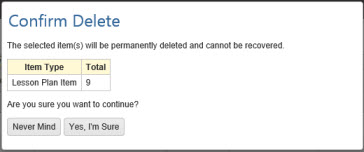
Click or touch the Action button and choose 'Delete' to open the Confirm Delete window. HSTOnline will show you the number of Appointments selected for deletion.
Click or touch:
'Never Mind' to cancel the delete process.
'Yes, I'm Sure' to complete the deletion process. HSTOnline will delete all of the selected items from the
database. Assignments already created from the selected Lesson Plan items will not be affected by this process.