Introduction
Create a list of the Supplies needed - either from Assignments or Lesson Plan items that have yet to be created as Assignments.
Assignments - choose to run the report for incomplete or completed Assignments, or both, for a date range that you specify.
For Lesson Plans, select a Lesson Plan from the list to generate a list of Supplies for that plan.
The Supplies field must be enabled in order to utilize this report.
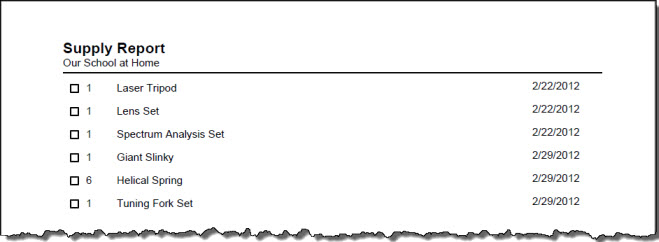
Supplies Report Options
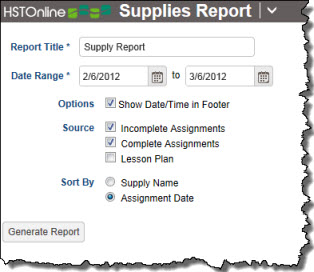
Set the options needed for the report. HSTOnline will remember your settings until you change them.
Report Title
The default name for this report is: Supply Report. You can change the Report Title to anything you like, up to 150 characters.
Date Range
Select a date range for the report. Enter a date using the mm/dd/yyyy format or click or touch the Calendar icon to select a date. The date range determines which incomplete and/or complete Assignments the Supplies list will be generated from.
Options
Show Date/Time in Footer: Choose whether to display the date and time when the Home/Away report was generated. The date and time will be determined based on your Time Zone settings.
Source
- Incomplete Assignments: Supplies tied to any Assignment which has no checkmark in the Complete: Teacher box and falls within the selected date range will be included in the report.
- Complete Assignments: Supplies tied to any Assignment which has a checkmark in the Complete: Teacher box and falls within the selected date range will be included in the report.
- Lesson Plan: Check this box to include supplies from a specified lesson plan. If you choose this option, a drop down box will appear. Select a Lesson Plan from the list.
Sort By
When pulling Supplies from Assignments, choose whether supplies will be sorted by supply name or by assignment date. When pulling Supplies from a Lesson Plan, items are listed in alphabetical order.
Generating a Supplies Report
- On the HSTOnline menu, click or touch 'Supplies' under the 'Reports' section.
- Fill out the Report options as needed. HSTOnline will remember your settings until you change them.
- Click or touch the Generate Report button. HSTOnline will create the report using the options you have set.
- When the report is ready, the Pick Up Report button becomes visible. Click or touch it to download the generated file.
- All reports are created as PDFs which you can review, print, email as you would with any PDF document.
- If you made an error in your option settings, just reset the options as needed and click or touch Generate Report again.