Grading
Grading is optional in HSTOnline. If you do not wish to use the grading features, you can disable this feature in the Program Options menu. When Grading is enabled, you can grade every Assignment or selected Assignments. To generate an entry on a Report Card or Transcript you need to create a minimum of one completed, graded Assignment for each Subject or Subject/Course for each term. Directions for creating minimal entries for these reports can be found in the Report Card or Transcript Help Pages.
Grades can be reviewed and edited in the Student - Grading Overview page and printed in a Report Card and/or Transcript.
HSTOnline allows you to choose how grades are to be calculated for your students, using either the traditional Averages method, or by dividing the total points earned by the total points possible. You must choose one method for all students. You may change your selection at any time. Make your selection in the Program Options menu. The options are outlined below with examples demonstrating how the different options may affect your student's overall grades. The Student - Grading Overview will show exactly how each Term grade was calculated using the grading method you selected.
In addition to selecting the calculation method, you can also choose how percentage grades will be rounded: to a whole number (0); to one decimal place (0.0); or to two decimal places (0.00).
Enabling Grading
Grading is an optional feature and can be enabled and disabled using via Program Options in the HSTOnline menu.
Disabling this feature will:
- Hide the Grading Scales list in the 'Manage Lists' section of the HSTOnline menu
- Hide the Grading Overview option in the 'Students' section of the HSTOnline menu
- Remove the Poss (points possible) field and column from the Lesson Plan add/edit window and Lesson Plan grid
- Remove the Earn (points earned) and Grade fields and columns from the Assignment add/edit window and the Agenda - List View grid
- Disable Weighted Grading in Courses
- Disable the Report Card and Transcript
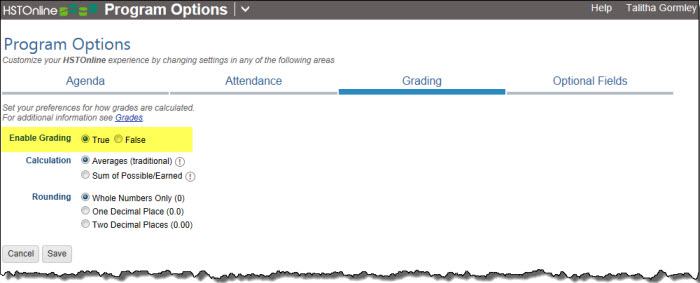
- On the HSTOnline menu, click or touch Program Options.
- On the Program Options page, click or touch the Grading tab.
- In the Enable Grading area, click or touch True to enable grading; click or touch False to disable grading.
- Click or touch Save to keep your changes.
- Click or touch 'Ok' on the 'Changes Saved' window.
Grading an Assignment
You can grade one, some, most, all or none of your Student's Assignments. It is entirely up to you. In order to generate an entry for a Subject/Course on the Report Card or Transcript you need to create a minimum of one completed, graded Assignment for each Subject or Subject/Course for each term. Directions for creating minimal entries for these reports can be found in the Report Card or Transcript Help Pages.
- Edit the Assignment you wish to grade.
- Enter the points possible for the assignment. This can also be entered when creating the Assignment or Lesson Plan item.
- Enter the points earned for the assignment.
- Check the Teacher box in the Complete field.
- As soon as all three of those fields are filled accordingly, HSTOnline will display the percentage grade for that Assignment.
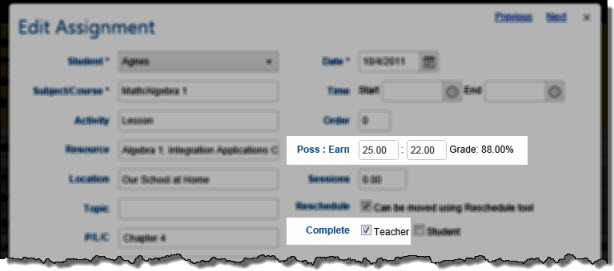
Assignment Edit Window - Grading Fields - Click or touch:
- Cancel to abandon the changes and close the Edit Assignment window.
- Save to commit the changes to your Assignment and close the Edit Assignment window.
- The Previous or Next hyperlink in the top right corner to save your changes to this Activity and move to the previous or next Activity in the list. You can click or touch Previous or Next until you have made all the changes you want to your Activities and then click the Save button to end the Edit process. If you reach the beginning or end of the list when clicking or touching Previous or Next, the Edit window will close and you will be returned to the list view.
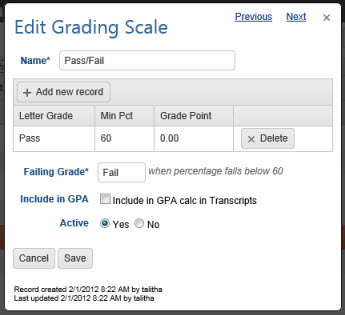
Pass/Fail Grading
If you wish to apply Pass/Fail grades to your student's work you will want to set up a Grading Scale to award those values. You will still need to enter points possible and points earned, but you can enter simply 1 point possible for these items, and then enter 1 point earned for passed items and 0 points earned for failed items.
It is customary that Pass/Fail grades not be included in the GPA calculation. To that end when creating a Pass/Fail grading scale, we recommend that you uncheck the box to 'Include in GPA Calculation in Transcripts. The choice, however, is entirely up to you.
Grade Calculation Method - Averages (Traditional)
In this method, a percentage grade is calculated for each completed Assignment with a Points Possible value greater than zero. Those grades are then averaged together for an overall Term grade. Term grades are averaged together to generate a Yearly grade and reported on the Report Card and Transcript.
Individual Assignments
- Grades are only calculated for Assignments which have points possible value greater than zero and a check in the Teacher box of the Complete field.
- HSTOnline calculates the grade for the assignment by dividing the points earned for the Assignment by the points possible for the Assignment.
- The percentage grade is displayed in the Grade field of the Assignment Edit window, in the Grade column of the Agenda - List View, and in the Assignment Tool Tip of the Agenda - Calendar View.
Term Grades
- For Assignments with no Course specified, the Term grade is calculated by:
- adding up all the percentage grades for assignments in that Subject for the Term
- dividing that sum by the number of graded assignments for the Subject for the Term
- attributing a letter grade based on the Default Grading Scale
- For Assignments in Courses without weighted grading, the Term grade is calculated by:
- adding up all the percentage grades for assignments in that Course for the Term
- dividing by the number of graded assignments for the Course for the Term
- attributing a letter grade based on the Grading Scale you have selected for the Course.
- For Assignments in Courses with weighted grading, the Term grade is calculated by:
- adding up all the percentage grades for assignments in each weighted Activity of the Course for the Term
- dividing by the number of graded assignments in each weighted Activity of the Course for the Term
- multiplying that result by the weight assigned to the respective Activity of the Course
- adding together all the weighted values to get the final grade
- attributing a letter grade based on the Grading Scale you have selected for the Course.
- See: Weighted Grading.
Yearly Grades
Yearly grades are determined by calculating a simple average of the Term grades that have already been calculated and rounded according to your option settings. A letter grade is attributed based on the appropriate Grading Scale.
| Subject | Course | Activity | Pts Poss | Pts Earn | Grade |
|---|---|---|---|---|---|
| Math | Algebra | Test | 50 | 35 | 70.00% |
| Math | Algebra | Test | 100 | 82 | 82.00% |
| Math | Algebra | Test | 100 | 80 | 80.00% |
| Math | Algebra | Test | 100 | 78 | 78.00% |
| Math | Algebra | Lesson | 35 | 34 | 97.14% |
| Math | Algebra | Lesson | 10 | 9 | 90.00% |
| Math | Algebra | Lesson | 10 | 9 | 90.00% |
| Math | Algebra | Lesson | 10 | 9 | 90.00% |
| Math | Algebra | Lesson | 10 | 10 | 100.00% |
| Math | Algebra | Lesson | 50 | 48 | 96.00% |
| Math | Algebra | Lesson | 25 | 24 | 96.00% |
| Total | 969.14% | ||||
| Average | 88.10% |
Term 1 - Averages
- There are eleven Assignments - 4 tests and 7 lessons - which have a combined total of 969.14 percent which, when divided by the number of Assignments (11), gives us
88.10% which becomes:
- 88.1% for one decimal point rounding
- 88% for whole number rounding
| Subject | Course | Activity | Pts Poss | Pts Earn | Grade |
|---|---|---|---|---|---|
| Math | Algebra | Test | 50 | 25 | 50.00% |
| Math | Algebra | Test | 100 | 95 | 95.00% |
| Math | Algebra | Test | 100 | 72 | 72.00% |
| Math | Algebra | Test | 100 | 73 | 73.00% |
| Math | Algebra | Test | 100 | 81 | 81.00% |
| Math | Algebra | Lesson | 50 | 50 | 100.00% |
| Math | Algebra | Lesson | 50 | 48 | 96.00% |
| Math | Algebra | Lesson | 35 | 33 | 94.29% |
| Math | Algebra | Lesson | 10 | 9 | 90.00% |
| Math | Algebra | Lesson | 10 | 10 | 100.00% |
| Math | Algebra | Lesson | 10 | 10 | 100.00% |
| Total | 951.29% | ||||
| Average | 86.48% |
Term 2 - Averages
- There are eleven Assignments - 5 tests and 6 lessons - which have a combined total of 951.29 percent which, when divided by the number of Assignments (11), gives us
86.48% which becomes:
- 86.5% for one decimal point rounding
- 87% for whole number rounding
Yearly Grade for Math: Algebra
To get a yearly grade, the calculated, rounded averages for each term are divided by number of terms. Using the examples above:
- If your Term grades are rounded to the nearest whole number:
- (88 + 87)/2 = 87.5% which becomes 88%.
- If your Term grades are rounded to one decimal point:
- (88.1 + 86.5)/2 = 87.3%
- If your Term grades are rounded to two decimal points:
- (88.10 + 86.48)/2 = 87.29%
Grade Calculation Method - Sum of Earned/Possible
In this method, a percentage grade is calculated for each completed Assignment with a Points Possible value greater than zero so that you can see your Student's progress on each graded item. However, with the Sum of Earned/Possible option selected, Term grades are calculated by taking the total points earned for all completed Assignments and dividing that value by the total points possible for all of those items, essentially treating all of the individual Assignments as one single Assignment for the Term. Term grades, rounded to meet your option settings, are averaged to calculate a Yearly grade as reported on the Report Card and Transcript.
Individual Assignments
- Grades are only calculated for Assignments which have points possible value greater than zero and a check in the Teacher box of the Complete field.
- HSTOnline calculates the grade for the assignment by dividing the points earned for the Assignment by the points possible for the Assignment.
- The percentage grade is displayed in the Grade field of the Assignment Edit window, in the Grade column of the Agenda - List View, and in the Assignment Tool Tip of the Agenda - Calendar View.
Term Grades
- For Assignments with no Course specified, the Term grade is calculated by:
- adding up all the points earned for the graded Assignments in that Subject for the Term
- dividing that sum by the total number of points possible for the graded assignments in the Subject for the Term
- attributing a letter grade based on the Default Grading Scale
- For Assignments in Courses without weighted grading, the Term grade is calculated by:
- adding up all the points earned for the graded Assignments in that Course for the Term
- dividing that sum by the total number of points possible for the graded assignments in the Course for the Term
- attributing a letter grade based on the Grading Scale you have selected for the Course
- For Assignments in Courses with weighted grading, the Term grade is calculated by:
- adding up all the points earned for the graded Assignments in each weighted Activity of the Course for the Term
- dividing that sum by the total number of points possible for the graded assignments in each weighted Activity of the Course for the Term
- multiplying that result by the weight assigned to the respective Activity of the Course
- adding together all the weighted values to get the final grade
- attributing a letter grade based on the Grading Scale you have selected for the Course.
- See: Weighted Grading.
Yearly Averages
Yearly grades are determined by calculating a simple average of the Term grades hat have already been calculated and rounded according to your option settings. A letter grade is attributed based on the appropriate Grading Scale.
| Subject | Course | Activity | Pts Poss | Pts Earn |
|---|---|---|---|---|
| Math | Algebra | Test | 50 | 35 |
| Math | Algebra | Test | 100 | 82 |
| Math | Algebra | Test | 100 | 80 |
| Math | Algebra | Test | 100 | 78 |
| Math | Algebra | Lesson | 35 | 34 |
| Math | Algebra | Lesson | 10 | 9 |
| Math | Algebra | Lesson | 10 | 9 |
| Math | Algebra | Lesson | 10 | 9 |
| Math | Algebra | Lesson | 10 | 10 |
| Math | Algebra | Lesson | 50 | 48 |
| Math | Algebra | Lesson | 25 | 24 |
| Total | 500 | 418 | ||
| Pct | 80.10% | |||
Term 1 - Sum of Earned/Possible
- There are eleven Assignments - 4 tests and 7 lessons - which have a total
points possible of 500 and a total points earned of 418.
Dividing earned/possible gives a value of 80.10%, which becomes:- 80.1% for one decimal point rounding
- 80% for whole number rounding
| Subject | Course | Activity | Pts Poss | Pts Earn |
|---|---|---|---|---|
| Math | Algebra | Test | 50 | 25 |
| Math | Algebra | Test | 100 | 95 |
| Math | Algebra | Test | 100 | 72 |
| Math | Algebra | Test | 100 | 73 |
| Math | Algebra | Test | 100 | 81 |
| Math | Algebra | Lesson | 50 | 50 |
| Math | Algebra | Lesson | 50 | 48 |
| Math | Algebra | Lesson | 35 | 33 |
| Math | Algebra | Lesson | 10 | 9 |
| Math | Algebra | Lesson | 10 | 10 |
| Math | Algebra | Lesson | 10 | 10 |
| Total | 615 | 506 | ||
| Pct | 82.28% | |||
Term 2 - Sum of Earned/Possible
- There are eleven Assignments - 5 tests and 6 lessons - which have a total points possible of 615 and a total points earned of 506. Dividing earned/possible gives a value of
82.28%, which becomes:
- 82.3% for one decimal point rounding
- 82% for whole number rounding
Yearly Grade for Math: Algebra
To get a yearly grade, the calculated, rounded averages for each term are divided by number of terms. Using the examples above:
- If your Term grades are rounded to the nearest whole number:
- (80 + 82)/2 = 81%
- If your Term grades are rounded to one decimal point:
- (80.1 + 82.3)/2 = 81.2%
- If your Term grades are rounded to two decimal points:
- (80.10 + 82.28)/2 = 81.19%