Introduction
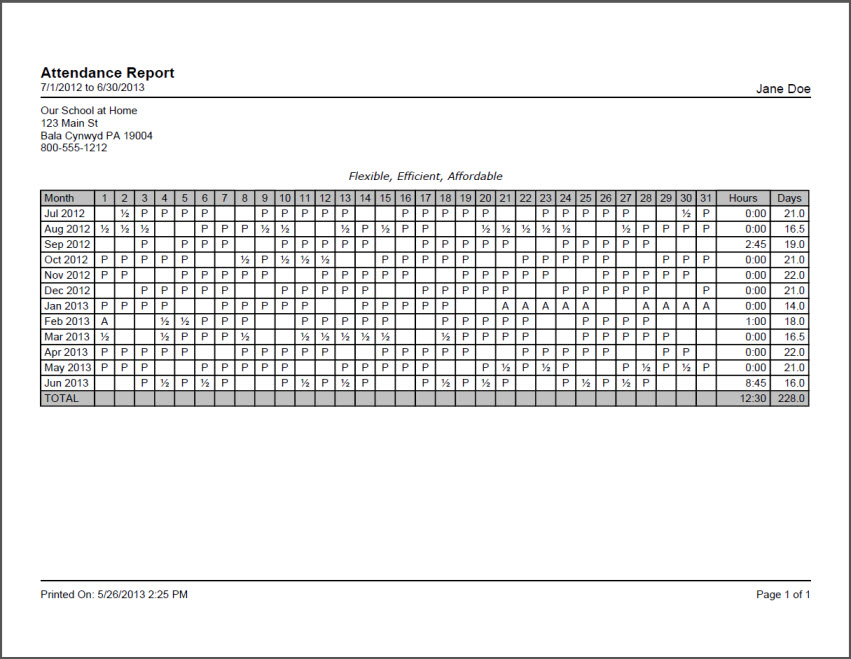
The Attendance report documents days and hours spent schooling. You can print an Attendance report for any date range and choose to show or hide the Attendance Hours you are tracking with Time Spent, Sessions or Manual Hours in the attendance entries. Each Student's attendance will be displayed on a separate page.
On any date, the report will show: |
|
Attendance Report Options
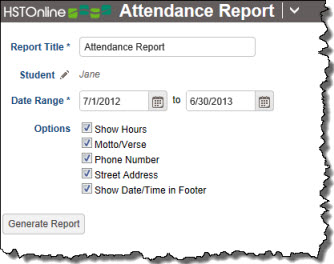
Set the options needed for the report. HSTOnline will remember your settings until you change them.
Report Title
The default name for this report is: Attendance Report. You can change the Report Title to anything you like, up to 150 characters.
Student
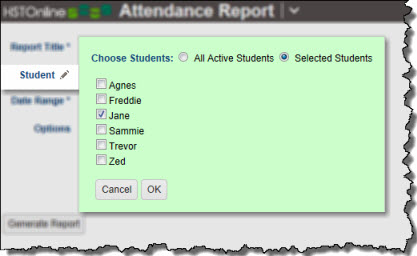
Click or touch the Student field name or the pencil icon to choose the Students to be included in this report. You can choose 'All Active Students' or choose 'Selected Students' and then choose from your list.
Date Range
Select a date range for the report. Enter a date using the mm/dd/yyyy format or click or touch the Calendar icon to select a date.
The date range will determine how many month rows appear in the Report. Attendance records which appear within the selected date range will be displayed as:
|
Include
- Show Hours: This option will only appear if you have selected an option other than 'None' in the Time Entry section of the Attendance Options. If you are tracking hours in your Attendance records, you can then choose to have those hours - Manual Hours, Time Spent, or Sessions - displayed in the Hours column in this report.
- Motto/Verse: Choose whether to have your School Motto/Verse (that you entered in your School Profile) printed on the report above the Attendance grid.
- Phone Number: Your School Name will always appear in the top left corner of the Attendance report. Use this option to choose whether or not to include the School phone number as well.
- Street Address: Your School Name will always appear in the top left corner of the Attendance report. Use this option to choose whether or not to include the School Address as well.
- Show Date/Time in Footer: Choose whether to display the date and time when the Attendance report was generated. The date and time will be determined based on your Time Zone settings.
Generating an Attendance Report
- On the HSTOnline menu, click or touch 'Attendance' under the 'Reports' section.
- Fill out the Report options as needed. HSTOnline will remember your settings until you change them.
- Click or touch the Generate Report button. HSTOnline will create the report using the options you have set.
- When the report is ready, the Pick Up Report button becomes visible. Click or touch it to download the generated file.
- All reports are created as PDFs which you can review, print, email as you would with any PDF document.
- If you made an error in your option settings, just reset the options as needed and click or touch Generate Report again.